Our Virtual Classroom
A real learning experience, designed by Smartious for learners anywhere
The Smartious live classroom: a real teacher on video, a shared whiteboard with maths instruments, practical science simulations, chat and raise-hand, and a Data Saver for weak internet.
Our own live classroom, built for small groups: a real teacher, a shared whiteboard, practicals on screen, and a connection that copes with slow internet.
Every Smartious lesson takes place in our own virtual classroom, built by Smartious for teaching rather than borrowed from a meeting app. Students join from a laptop or desktop browser, with nothing to install. They see and hear a qualified teacher in real time, work on the same whiteboard, run science practicals on screen, ask questions in chat or by raising a hand, and get homework the moment the lesson ends. Classes are small (4-6 students), so every student is seen and heard.
- Live Teacher
- Interactive Whiteboard
- Science Simulations
- Data Saver
- Laptop or Desktop
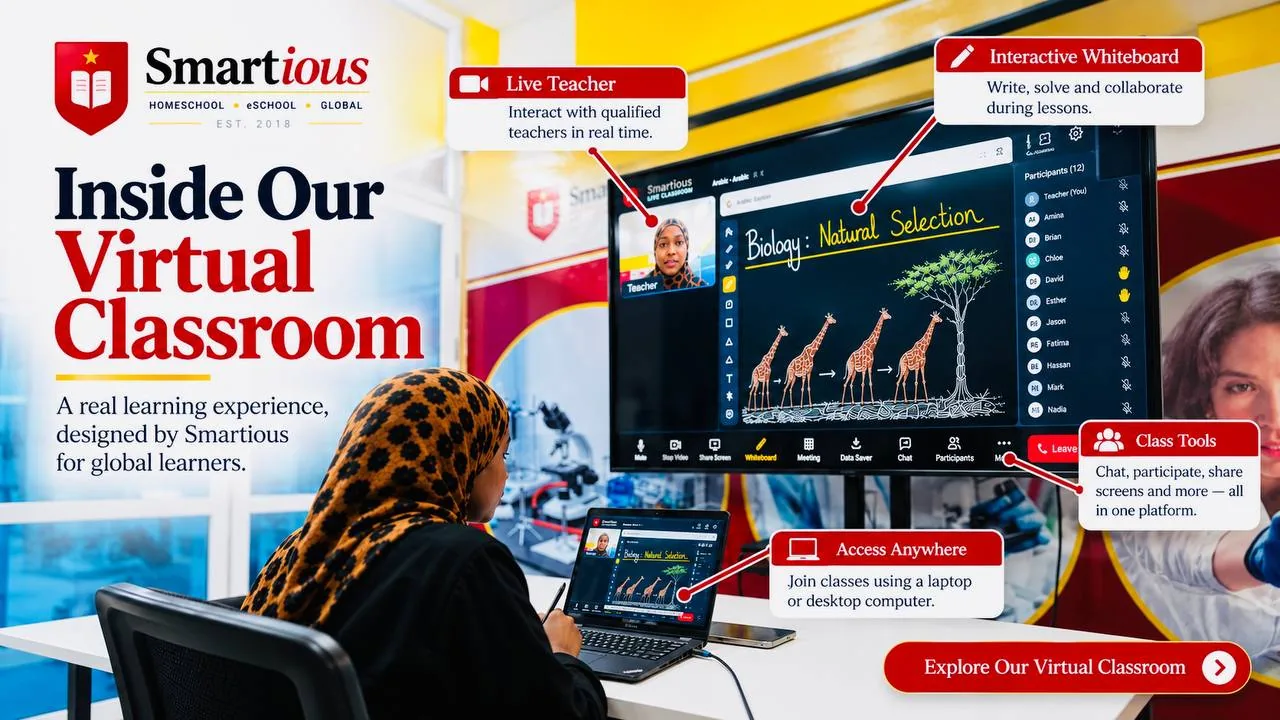
A live teacher, not a video
Every lesson is taught live. Students see and hear their teacher, and the teacher sees and hears them, so questions are answered on the spot and nobody hides at the back. Students raise a hand, unmute to speak, or type in the class chat, and the teacher can see who is present, who is speaking and who needs help.
A whiteboard everyone shares
The whiteboard is the centre of the lesson. The teacher writes, draws and solves problems on it with pen, shapes, text and colours, and can let students write on it too, or lock it while explaining. It has a ruler, a protractor and a compass for geometry and construction questions, and the teacher can put a picture or a page from the Smartious Library straight onto the board to work through it together. Students who join late see everything already written.
Science practicals on screen
Practical work does not stop online. The classroom opens Smartious practical simulations, including vernier callipers, food tests, an acid-base titration taken through to the calculation, and an electricity practical where students build the circuit and take readings, alongside science simulations from PhET at the University of Colorado for physics, chemistry and biology. Each student runs their own copy, so everyone practises rather than just watching.
Screen sharing and presentations
Teachers share their screen, with sound when they play a video, and the classroom switches every student to the presentation view automatically. A meeting view shows everyone together for discussions, assemblies and club sessions.
Built for slow and unreliable internet
Many of our families live where the internet is slow or drops. The classroom always gives the teacher's voice and the whiteboard priority over video. Data Saver sends your own camera smaller, stops downloading other students' cameras, and keeps the teacher's video at low quality; it switches on by itself when a connection stays weak, and anyone can turn it on with one tap. Each video tile shows a connection light, the classroom names who has slow internet so nobody wonders whose side it is, and if a connection drops, it reconnects automatically while the student stays on the page.
Lessons recorded, homework sent
Lessons can be recorded so students can watch them again for revision. When the teacher closes the lesson, the homework for that lesson goes to each student automatically, and parents see attendance and weekly reports in the parent portal.
What you need
A laptop or desktop computer with a recent Chrome, Edge, Firefox or Safari browser, a webcam and microphone (most laptops have both), and headphones if possible. A steady connection of 1 Mbps or more is comfortable; with Data Saver on, a lesson works on much less, because voice and the whiteboard use very little data.
Why Smartious
Most online schools teach through a general meeting app. Smartious built its own classroom for teaching: a whiteboard with real maths instruments, practical simulations, small live groups, automatic homework, and a Data Saver designed for the connections our families actually have.
Fees
From USD 423/month for Primary, payable termly; varies by curriculum and level. One-to-one tuition: USD 15/hour.
Other services
- Homeschool at Home
- Smartious Learning Centre
- Virtual School (Online)
- Private Tuition
- Mshauri AI Tutor
- Exam Preparation
What parents say
Rated 4.9 out of 5 on Google from 130+ reviews. Read our Google reviews
“What stands out most about Smartious Homeschool and Tuition is their dedication to each learner. They don't rush through topics but ensure the child fully understands before moving forward. The progress my child has made in a short time is impressive. I would definitely recommend them to any parent.” — Google reviewer, Google review